
Product
Campaign Journeys
Build the path a recipient takes after they scan their PURL
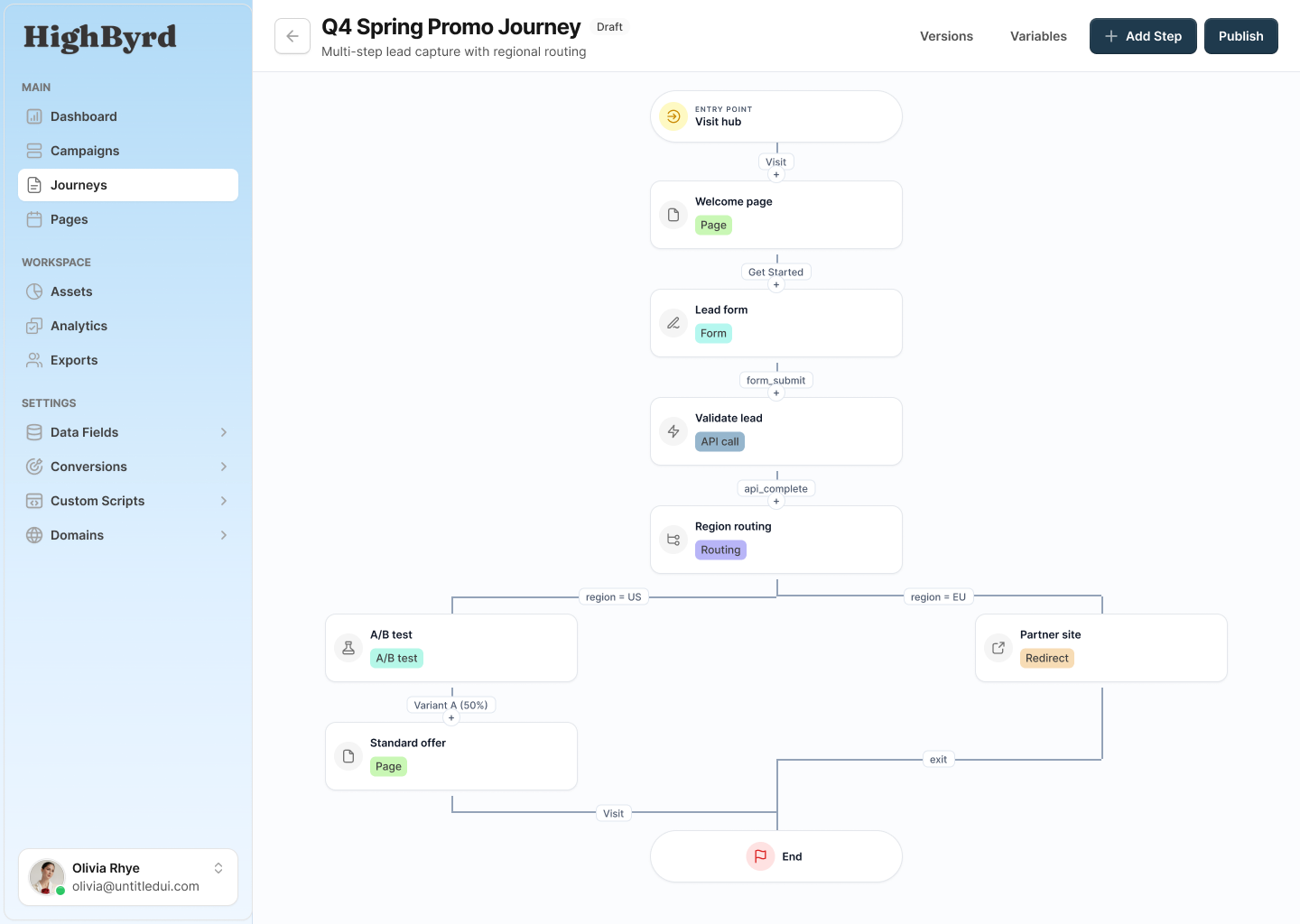
Design the path on a canvas
Lay out every step a recipient can reach and draw the connections between them.
Drag and connect nodes
Each step is a node on the canvas. Connect nodes to set the order a recipient moves through the journey.
One path, many branches
Add routing and A/B nodes to split the path so different recipients reach different steps from the same starting point.
See the whole journey
The canvas shows the full structure at once, so the steps and the conditions between them stay readable as the journey grows.
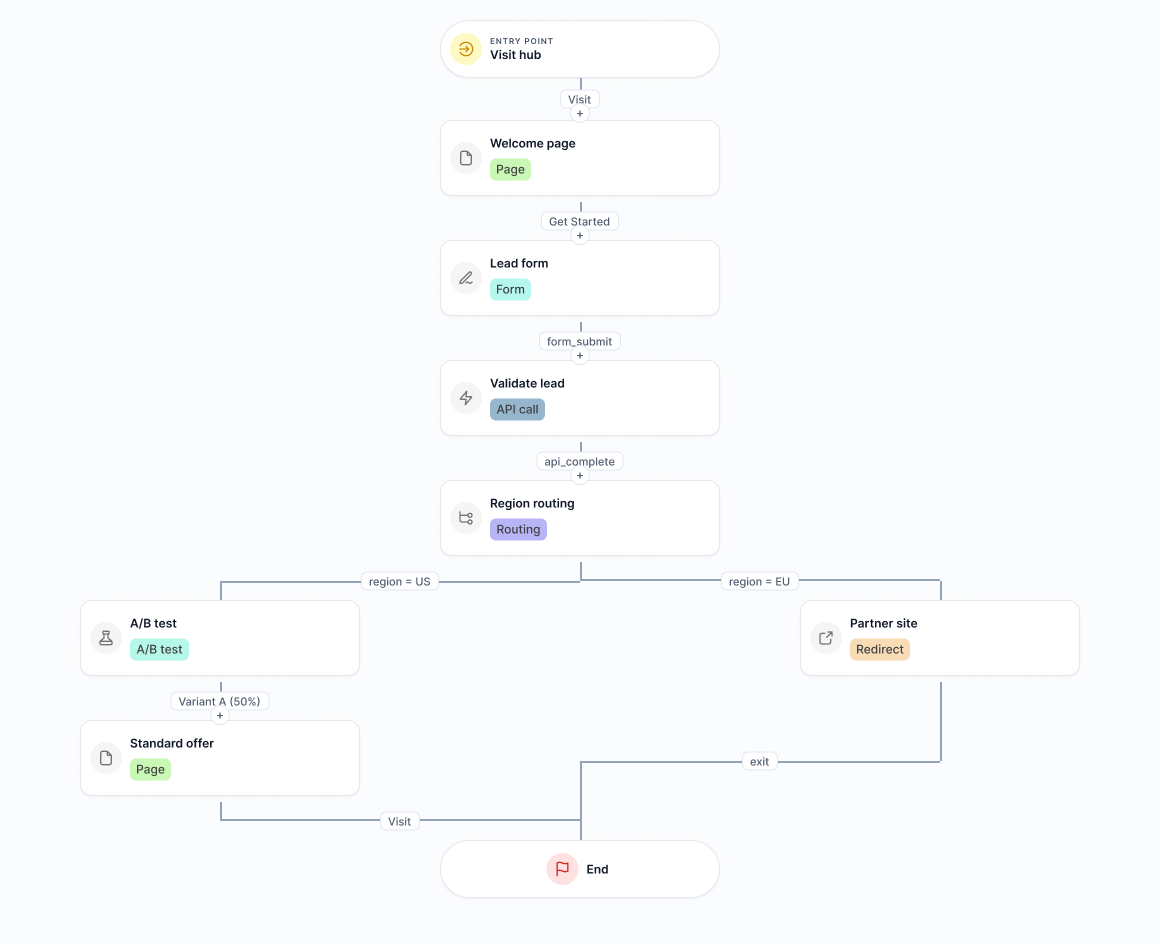
Seven step types
Every node on the canvas is one of these steps. Combine them to build the experience you want.
Page
Show a personalized page, with recipient fields and journey variables interpolated into the content.
Form
Collect input from the recipient. Submitted fields become runtime variables you can use later in the journey.
Redirect
Send the recipient to a URL you specify.
API call
Make a configurable outbound HTTP request: set method, headers, and a body template, choose a 1 to 60 second timeout, and map JSON response fields into variables.
Routing
Branch the path on conditions evaluated over member fields or journey variables.
A/B test
Split recipients by percentage. Each recipient keeps a sticky variant for the rest of their journey.
Lookup
Resolve a base-domain code lookup as part of the path.
Triggers and variables
Transitions decide when a recipient advances, and variables carry data through the journey.
Transitions advance the recipient
A transition moves a recipient to the next step. It can be triggered by cta_click, form_submit, api_complete, api_timeout, api_error, route, or ab_variant.
Priority-ordered and conditional
Multiple transitions can leave a step. Order them by priority and attach conditions so the right one fires first.
Static variables
Organization-level constants you set once and reuse across the journey.
Runtime variables
Values extracted from an API response, querystring parameters, or form submissions, captured as the recipient moves through the journey.
Used everywhere
Reference variables in routing conditions, API bodies, and page interpolation, using dot-path notation to reach nested fields.
Edit live without disrupting visitors
Every save publishes a version, and recipients stay on the version they started.
Immutable versions
Each save publishes a new version of the journey. Published versions are not changed in place.
In-flight recipients are pinned
Recipients already in a journey stay pinned to the version they started on, so editing the live draft never disrupts visitors mid-path.
Rollback and restore
Restore an earlier version when you need to roll a change back.
Why it holds up
What sets the journey builder apart
The canvas is built for branching paths and for editing safely while recipients are moving through them.
Follow-up that lives on the page
Follow-up is the sequence of pages, forms, routing, and an outbound API step the recipient experiences on the page, not an email or text sequence.
Safe to edit while live
Immutable versioning pins in-flight recipients to the version they started on, so you can change the draft without breaking journeys in progress.
Data flows through the whole path
Static and runtime variables move with the recipient and feed routing conditions, API bodies, and page content using dot-path notation.
Map the path your recipients take
Build a campaign journey on the canvas and connect every step a recipient can reach. Edit it live without disrupting the people already moving through it.
Campaign Journeys FAQ
Short answers to common questions about campaign journeys in HighByrd.
What is a campaign journey?
A campaign journey is the multi-step path a recipient takes on the page after visiting their personalized URL. You design it on a visual canvas by connecting nodes, where each node is a step such as a page, form, redirect, API call, routing branch, A/B split, or lookup. The journey decides what the recipient sees and where they go next based on their actions and data.
How does HighByrd automate follow-up?
Follow-up in HighByrd is the on-page journey itself, not an email or SMS drip. After a recipient visits their PURL, the journey moves them through pages, forms, routing, and A/B steps based on what they do. When you need to reach an outside system, the API call step sends the lead and its data to your endpoint over configurable HTTP, so the follow-up runs as part of the on-page experience rather than a separate messaging channel.
What step types can a journey include?
A journey is built from seven step types: page, form, redirect, API call, routing, A/B test, and lookup. Page and form drive the on-page experience, redirect sends the recipient to a URL, and lookup resolves a base-domain code. Routing and A/B test branch the path, while the API call step makes an outbound HTTP request to an external system.
How does an API call step work?
The API call step makes a configurable outbound HTTP request. You set the method, headers, and a body template, and choose a timeout between 1 and 60 seconds. When the response comes back, you map fields from the JSON into journey variables that later steps can use. The result also drives transitions, so the path can branch on api_complete, api_timeout, or api_error.
Can I edit a journey while recipients are in it?
Yes. Every save publishes a new, immutable version of the journey rather than changing the live one in place. Recipients already moving through the journey stay pinned to the version they started on, so editing the draft never disrupts visitors mid-path. You can also restore an earlier version when you need to roll a change back.
How do routing and A/B tests decide which path a recipient takes?
A routing step branches on conditions evaluated over member fields or journey variables, firing the matching transition. An A/B test step splits recipients by percentage and gives each one a sticky variant they keep for the rest of their journey. In both cases the choice fires a transition (route or ab_variant), and when several transitions leave a step they are ordered by priority so the right one fires first.