
Product
Custom Domains
Run branded PURLs on your own domain, with SSL and CDN handled for you
Branded PURLs on your domain
Recipients land on a domain you own, which reads as on-brand and trustworthy. On custom domains the PURL path is /:code.
Your name in the link
Links resolve under a domain you control, for example go.yourbrand.com/abc123, rather than a generic vendor URL.
Short, clean paths
Each PURL is served at /:code on your domain, so the address stays compact and readable.
Served fast over a CDN
Pages on custom domains are delivered through a CloudFront distribution, so they load quickly for recipients.
Recognized by recipients
Because the address carries your brand instead of a third party's, the link reads as trustworthy when it arrives.
Automated DNS, SSL, and CDN
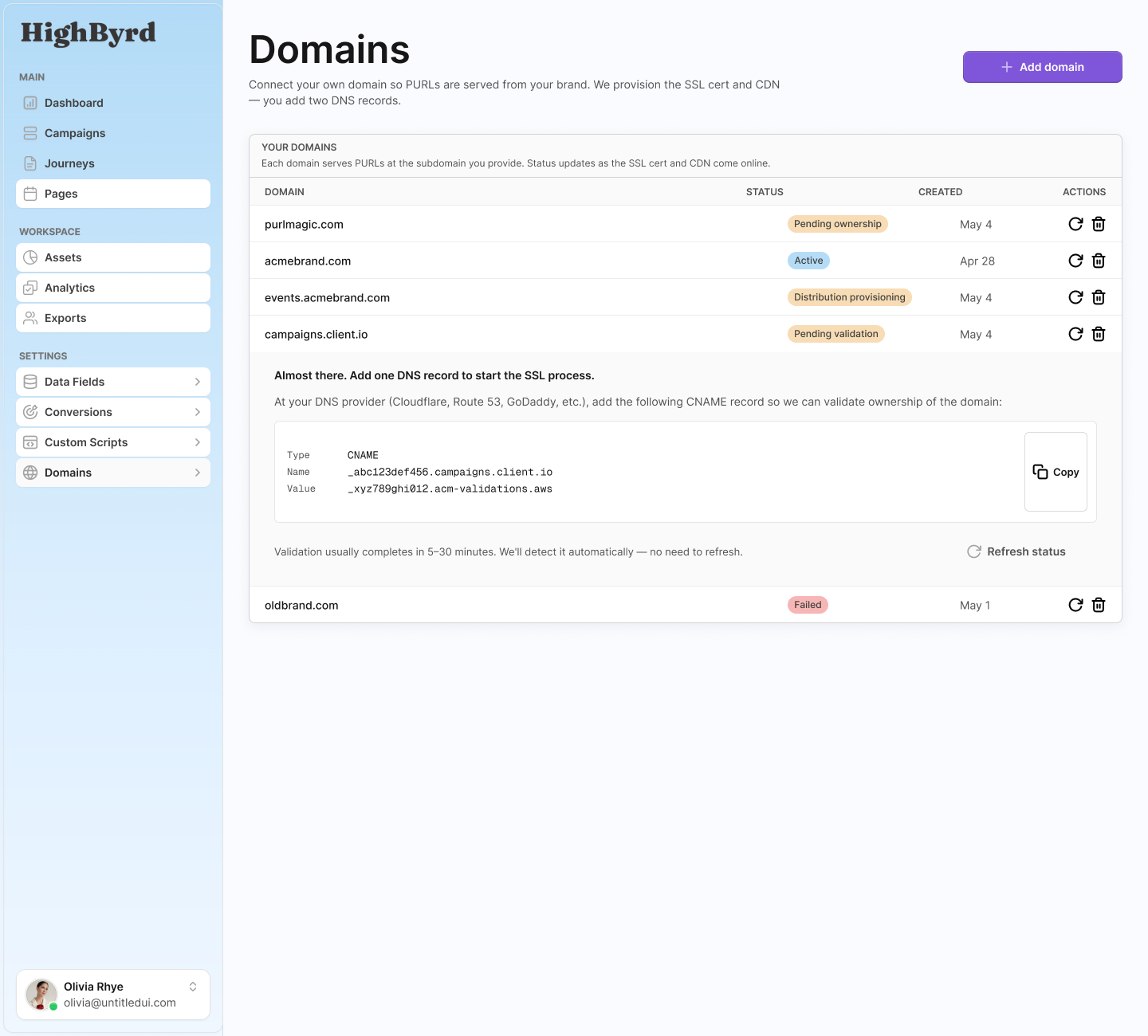
Domain setup is automated end to end. You add one DNS record, and the platform verifies ownership, issues a certificate, and provisions the CDN.
Ownership verified by DNS
You add a TXT DNS record to confirm you control the domain before anything goes live.
SSL certificate provisioned
An SSL certificate is requested through AWS ACM and validated with a CNAME record, so the domain serves over HTTPS.
CDN distribution created
A CloudFront CDN distribution is created for the domain, so PURL pages are cached and served close to recipients.
Clear status at each step
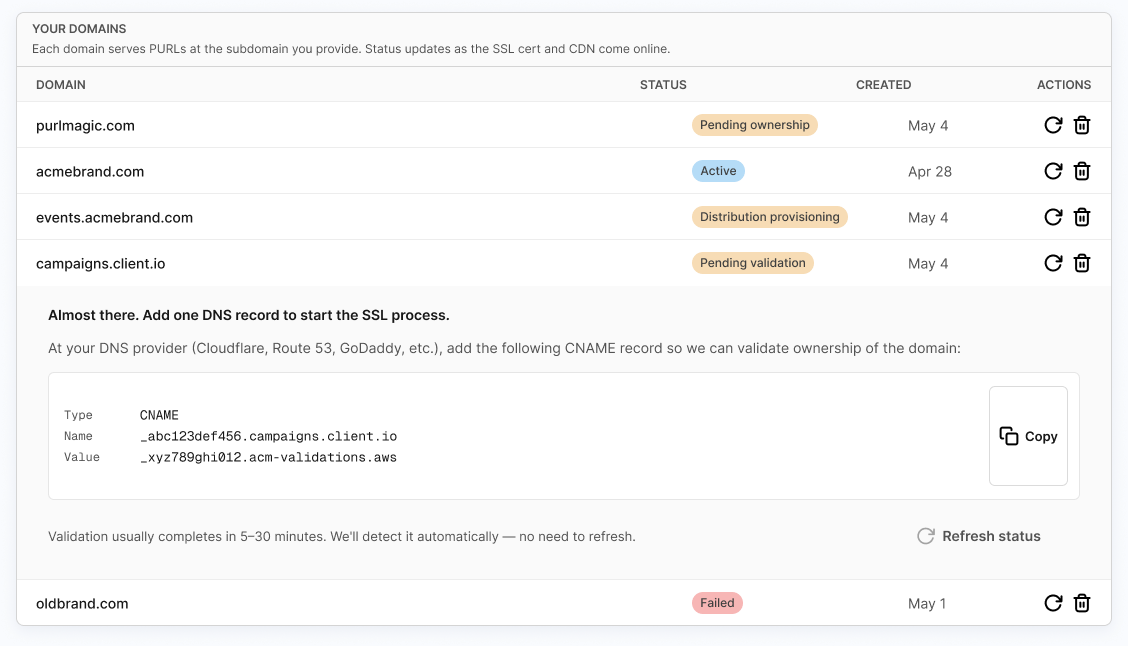
The domain advances through readable states: pending ownership, pending validation, certificate issued, distribution provisioning, and active.
Apex and root domains
DNS does not allow a CNAME record at the apex of a domain, so root domains such as yourbrand.com are handled specially.
Root domains supported
You can use a bare apex domain like yourbrand.com, not just a subdomain such as go.yourbrand.com.
Apex handled for you
The platform accounts for the DNS rule that forbids a CNAME at the apex, so apex setup is managed rather than left to you to work around.
Same verification and certificate flow
Apex domains go through the same TXT ownership check and ACM certificate validation as a subdomain.
Walk-in journeys on the base domain
Assign a published journey to run when someone visits the bare domain with no PURL code, and let them enter their code to reach their real PURL.
Journey on the bare domain
Choose a published journey to run when a visitor lands on the root domain without a /:code in the address.
Code lookup form
A lookup form lets the visitor enter the code they were given and be routed to their real PURL.
Built for offline-to-online
This fits in-store visits, call-in moments, and printed or spoken codes, where someone types the domain first and the code second.
Why it holds up
What sets the domain setup apart
The work that usually requires a DevOps ticket runs as a guided, automated flow tied to each domain.
Setup is automated, not manual
Ownership verification, certificate issuance through AWS ACM, and CDN provisioning happen as part of the flow once you add the required DNS records.
Apex domains are first class
Root domains are supported and handled around the DNS rule that forbids a CNAME at the apex, not treated as an edge case you have to solve yourself.
The base domain does real work
Instead of sitting idle, the bare domain can run a published journey and route code entry to the right PURL, connecting offline touchpoints to online ones.
Put your brand in every link
Add a domain, add one DNS record, and let HighByrd verify ownership, provision SSL, and stand up the CDN. Your PURLs go live on a domain you own.
Your Own Domain FAQ
Short answers to common questions about your own domain in HighByrd.
What is a branded PURL?
A branded PURL is a personalized URL served from a domain you control, such as go.yourbrand.com/abc123, instead of a generic vendor URL. Each recipient sees your brand in the address bar, which reads as trustworthy and on-brand. On custom domains the PURL path is /:code, and pages are served quickly through a CDN.
How do I set up a custom domain for my PURLs?
You add the domain in settings and place one TXT DNS record so HighByrd can verify you control it. From there the setup is automated: a certificate is requested through AWS ACM and validated with a CNAME record, and a CloudFront CDN distribution is created for the domain. You add the DNS records the platform asks for, and it handles the rest.
Can I use my root domain, like yourbrand.com, instead of a subdomain?
Yes. You can use a bare apex domain such as yourbrand.com, not just a subdomain like go.yourbrand.com. DNS does not allow a CNAME record at the apex of a domain, so HighByrd handles that rule for you rather than leaving you to work around it. Apex domains go through the same TXT ownership check and ACM certificate validation as a subdomain.
Who provisions the SSL certificate for my domain?
HighByrd does. Once you confirm ownership with a TXT DNS record, the platform requests an SSL certificate through AWS ACM and validates it with a CNAME record, so your domain serves over HTTPS. You do not buy or install a certificate yourself.
What happens when someone visits my domain without a PURL code?
You can assign a published journey to run when a visitor lands on the bare domain with no /:code in the address. That base-domain journey can show a lookup form where the visitor enters the code they were given and is routed to their real PURL. This walk-in path fits in-store visits, call-in moments, and printed or spoken codes.
How can I tell whether my domain setup is finished?
Each domain advances through readable states you can see in the domains list: pending ownership, pending validation, certificate issued, distribution provisioning, and active. When the domain reaches active, ownership is verified, the certificate is issued, and the CDN distribution is provisioned, so your PURLs are live on it.