
Product
Tracking & Analytics
See who responded by name, and what every campaign returned in dollars.
Every visit is a named event
Each recipient gets one record that stays with them across return visits, so you always know who is on the page.
One record per recipient
A single journey_progress row tracks each recipient. It is sticky across return visits, so repeat traffic updates the same person rather than inflating counts.
Who and when, by name
You see the recipient's name and the exact timestamp of their first visit, not an anonymous tally of clicks.
Response defined as first visit
A response is the recipient's first visit, recorded as started_at. That is the moment a person engaged with their personal URL.
Visitors list
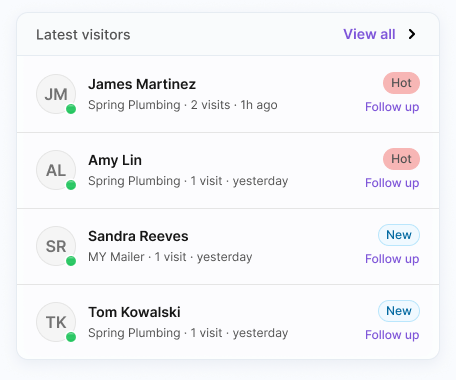
Each campaign has a visitors list showing the latest people by name, email, time, and whether they converted.
Your highest-intent follow-up list
Hot leads surface the people who just engaged but have not converted yet, so follow-up goes where intent is freshest.
What a hot lead is
A hot lead is a recipient who visited in the last 48 hours and has not yet converted.
Why 48 hours
The window keeps the list focused on recent activity, so your team works people while their interest is current.
Excludes converters
Once a recipient converts, they drop off the hot leads list. What remains is open, recent intent.
By name, ready to contact
Hot leads come with the recipient's name and timestamp, so the next call or message is already identified.
Conversions that carry a dollar value
Conversions are custom events you place on a journey step or transition, and each one records a value so campaigns report ROI.
Five conversion types
Conversions are typed as response, engagement, lead, qualified_lead, or sale, so you measure the outcomes that matter to your campaign.
Assigned to a step
Each conversion is assigned to a journey step or transition, so you know exactly where in the journey the outcome happened.
Static or dynamic value
A conversion can carry a static value, such as 100, or a dynamic value from a template like {{variables.deal_amount}}.
Real ROI per campaign
Because conversions carry dollar values, each campaign reports actual ROI rather than counts alone.
Dashboard KPIs, funnel, and exports
The dashboard rolls up the numbers across campaigns, and each campaign opens into funnel, visit-activity, and A/B detail.
Dashboard KPIs
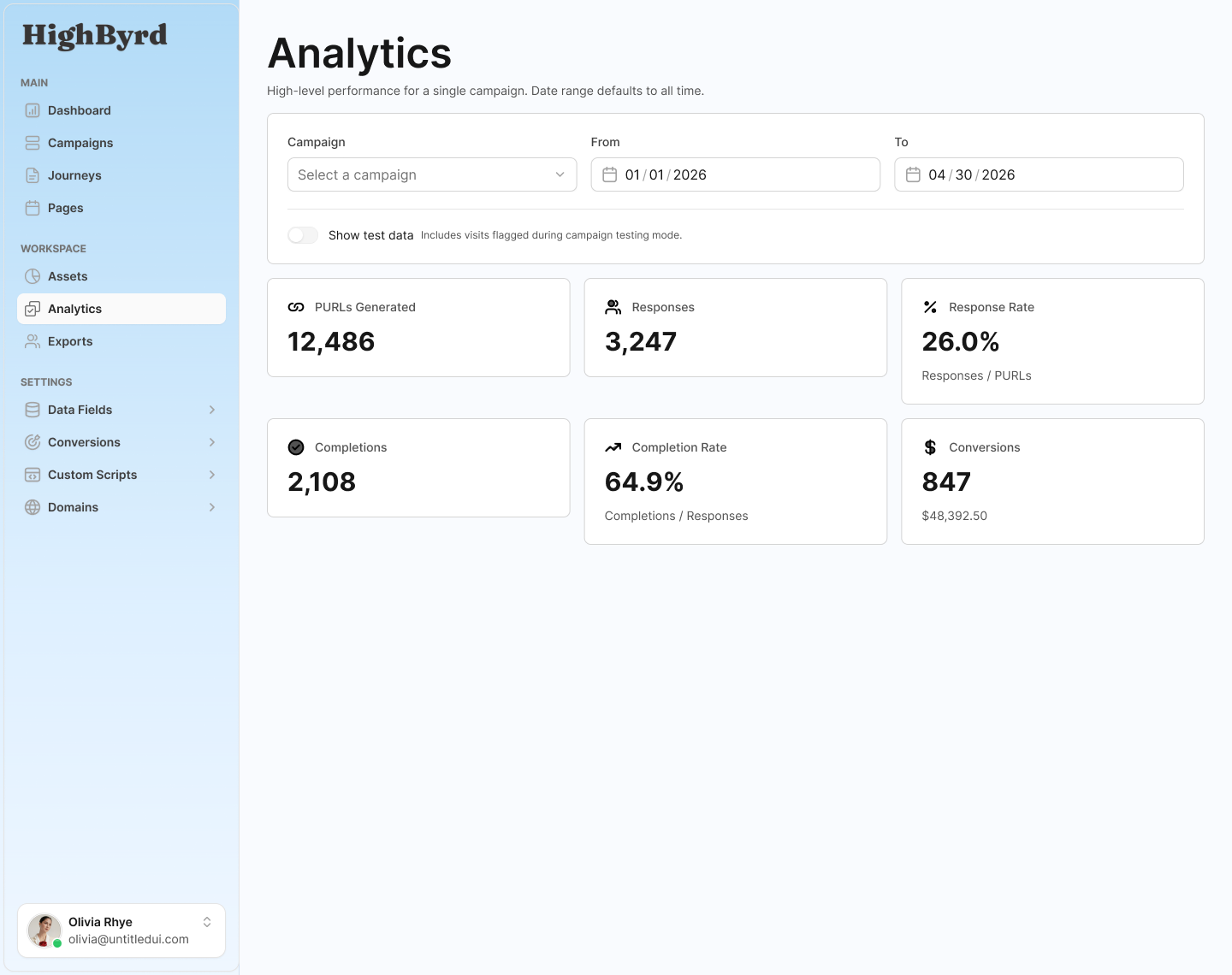
Total visits all-time and last 24 hours, response rate as visits over generated PURLs, active campaigns and those launched this week, and leads captured this week.
Campaign overview
Each campaign shows responses, conversion counts and rate, and response rate in a single overview.
Step-by-step funnel
The funnel charts drop-off step by step, so you can see where recipients move forward and where they stop.
30-day activity and A/B
A visit-activity chart covers the trailing 30 days, and A/B test results break down by variant.
CSV export
Responses export to CSV for your own reporting, CRM import, or offline analysis.

Why it holds up
Named responses, not matchback or anonymous counts
Most tracking tells you how many people visited. PURL tracking tells you which named people visited and what they were worth.
Named, not anonymous
Every visit is attributed to the recipient who received the PURL, so you follow up with people by name instead of guessing from aggregate traffic.
Measured, not matched after the fact
Conversions are recorded directly against the journey step with a dollar value, so ROI is built into the data rather than reconstructed by matchback later.
Clean by default
Test data is excluded from analytics by default and purged when a campaign goes live, so reported numbers reflect real recipients.
Know who responded, and what it was worth.
See named responses, hot leads, and per-campaign ROI in one place. Start tracking your first campaign by name.
Tracking & Analytics FAQ
Short answers to common questions about tracking & analytics in HighByrd.
Can I see who responded by name?
Yes. Every PURL visit is recorded as a named event tied to the recipient who received it, with their name and the timestamp of their first visit. You see who responded, not anonymous click counts, and each campaign has a visitors list showing the latest people by name, email, time, and whether they converted.
What is a hot lead?
A hot lead is a recipient who visited their personal URL in the last 48 hours and has not yet converted. The 48-hour window keeps the list focused on the freshest intent, so your team follows up while interest is still current. Once a recipient converts, they drop off the list, leaving only open, recent intent ready to contact by name.
What counts as a response?
A response is a recipient's first visit to their personal URL, recorded by name and timestamp as started_at. Each recipient has one sticky record, so return visits update the same person rather than inflating counts. That means a response is a named event, not an anonymous click.
How are conversions and ROI measured?
Conversions are custom events you assign to a journey step or transition, typed as response, engagement, lead, qualified_lead, or sale. Each conversion carries a value, either a static amount such as 100 or a dynamic value pulled from a template like {{variables.deal_amount}}. Because every conversion records a dollar value, each campaign reports real ROI rather than counts alone.
What KPIs does the dashboard show?
The dashboard rolls up total visits all-time and in the last 24 hours, response rate as visits over generated PURLs, active campaigns including those launched this week, and leads captured this week. Each campaign then opens into a step-by-step funnel that charts drop-off, a 30-day visit-activity chart, and A/B test results broken down by variant.
Can I export the data?
Yes. Responses export to CSV for your own reporting, CRM import, or offline analysis. Test data is excluded from analytics by default and purged when a campaign goes live, so the numbers you export reflect real recipients.